PageFox blogPublished guide
How to Identify Website Visitors: The Complete Guide
Most people who visit a B2B website never fill in a form. Visitor identification turns some of those visits into a likely company name. This guide covers how that works, how often it does not, and how PageFox agents turn a match into a next step.
The short answer
- Website visitor identification is the practice of matching an unnamed website visit to the organization the visitor is most likely browsing from. It works by resolving the network address behind the visit against a reference dataset of company networks, so it returns a company, not a person.
- It does not work on every visit. Home broadband, mobile data, VPNs, and shared networks all produce sessions that cannot be resolved to an employer.
- The output is only useful when the company name stays attached to the behaviour that produced it: which pages, how recently, how many times.
- In PageFox, the Visitor Agent names the company where it can, and the Chat and Enquiry agents answer anyone who reaches out. Nothing goes out to new people unless you approve it.
About this guide
- Written by
- Written by PageFox Editorial for founders and lean B2B teams evaluating how to identify website visitors.
- Review
- Product, research, editorial, and privacy-sensitive wording review is required before publication.
- Pricing method
- Every competitor price in the comparison table was read from the vendor’s own public pricing page on 16 September 2026 and is quoted with the plan name the vendor uses. Prices change; re-check before you buy.
- Boundary
- No PageFox match rate is claimed anywhere in this guide, because PageFox has not published a measured one. No customer outcome and no universal compliance claim is made.
What is website visitor identification?
Website visitor identification matches an unnamed visit to a likely company using its IP address, and tools like Snitcher start at 49 US dollars a month. Website visitor identification is the practice of matching an unnamed website visit to the organization the visitor is most likely browsing from. It works by resolving the network address behind the visit against a reference dataset of company networks, which means the result is a company, not a person.
That two-sentence definition already contains the two things most buyers get wrong. The first is the word "likely": a match is an inference drawn from a network registration, not a fact the visitor confirmed. The second is the word "company": no amount of extra company data turns an unnamed visit into a named individual, and a product that appears to do so is using a different data source with a different legal profile.
The category has several names, and they describe the same underlying mechanism. Website visitor identification software, website visitor tracking software and B2B visitor identification all refer to tools that observe a first-party session and attempt a company-level resolution on it. Where they differ is in the reference data behind the match, the geographic coverage of that data, and what the product does once a match exists.
The reason anyone bothers is arithmetic. On a typical B2B site the overwhelming majority of sessions end without a form fill, a demo request, or a chat message. Those sessions still contain real signal: someone read the pricing page twice this week. Visitor identification is an attempt to attach a name to a fraction of that signal so a founder who sells can act on it while it is still fresh.
How to identify website visitors: the pipeline in three decisions
Every product in this category runs the same three-stage pipeline. Understanding it is the difference between reading a vendor demo critically and being impressed by a list of logos.
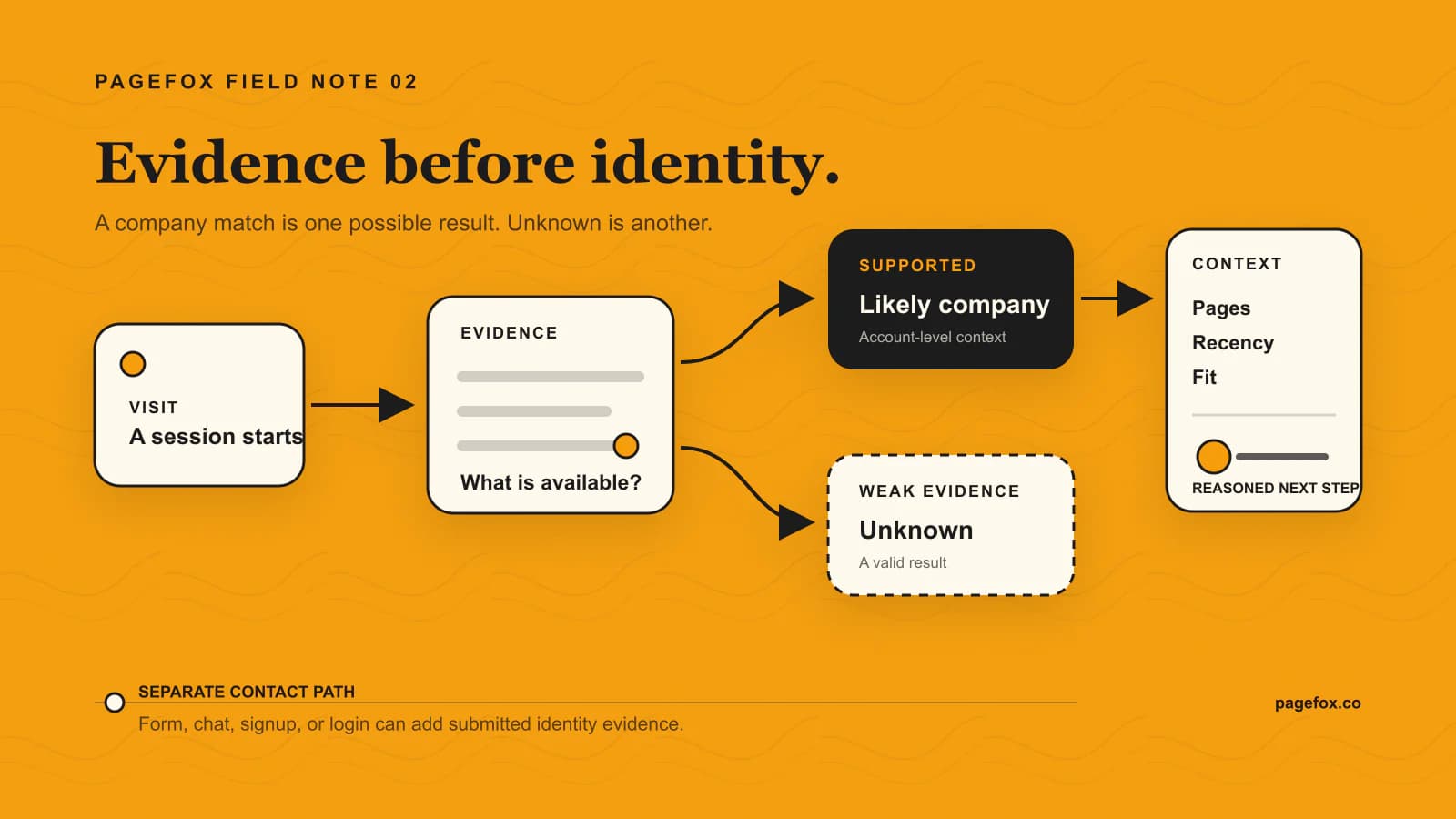
The evidence pipeline in three decisions
01Observe
A visit creates evidence
A script on your site records the session: pages viewed, order, referrer, timing, and the network context of the request.
02Resolve
Company or unknown
The session address is compared against a reference dataset of company networks. Weak or ambiguous evidence must stay unknown.
03Understand
Context decides the next step
Page path, recency, repeat visits, company fit, and anything the visitor submitted together decide whether the signal deserves a human.
Stage one: observe the visit without inventing an identity
A tracking script records that a session happened, which pages it covered, where it came from, and when the visitor returned. That is behavioural data about an event on your own site, and it is useful on its own. A visitor who reads two comparison pages and then the pricing page is behaving differently from one who bounces off the homepage, whether or not you ever learn who they are.
Keeping this stage conceptually separate matters, because it is the part that always works. If the identification layer returns nothing, you still have the behaviour. Any tool whose dashboard is empty when the match fails has built the product the wrong way round.
Stage two: resolve the network address to a company
This is the step people mean when they say IP-to-company lookup. Blocks of internet addresses are registered to organizations, and commercial datasets map those registrations to company records. When a session arrives from an address inside a block registered to a named business, the service can propose that business as the likely visitor.
The proposal is only as good as three things: how current the registration data is, how well the dataset covers your visitors’ geography, and how conservative the vendor is about publishing a weak match. The third is the one nobody advertises. A vendor that reports a match on thin evidence produces a fuller-looking dashboard and a worse one, because your team spends its attention on companies that never visited.
You can see the raw version of this step for yourself. Our free reverse IP lookup runs a single address through the resolution stage and shows you what comes back, which is the fastest way to develop an instinct for how often the answer is genuinely useful.
Stage three: add context, without pretending the match got stronger
Once a candidate company exists, the tool attaches firmographics to it: industry, headcount band, headquarters location, sometimes a technology profile. This makes the record more useful for filtering. It does not make the underlying match more certain, and a well-built product keeps that distinction visible rather than presenting a polished company card that implies confidence the evidence does not support.
When you evaluate a vendor, ask to see a low-confidence match. Ask what the product does with it. The answer tells you more about the engineering than any headline number will.
Why most visits stay unknown, and why that is the honest answer
Here is what the category prefers not to lead with: many visitors produce no company match at all. PageFox is built around that, which is why every PageFox view still shows behaviour, traffic source, page path, and score for a visitor whose company is unknown.
We do not publish a PageFox match rate, because we have not measured one under conditions we would be willing to defend in public. A match rate quoted without a denominator, a date, a traffic mix, and a geography is a marketing number, and the honest response to "what percentage will you identify on my site" is that nobody can tell you before seeing your traffic.
The reasons a session fails to resolve are structural rather than fixable.
| Traffic condition | What the resolution step sees | Honest treatment |
|---|---|---|
| Home or consumer broadband | The address belongs to an internet provider, not an employer. | Return unknown. A provider name is not a company match. |
| Mobile data | The address belongs to a carrier or shared mobile infrastructure. | Return unknown. Never present the carrier as the visitor’s employer. |
| VPN or corporate proxy | The visible address belongs to the VPN operator or an exit node. | Lower confidence, or return unknown. |
| Shared office or coworking network | One address, many unrelated businesses behind it. | Treat any association as weak context, never as proof. |
| Small business on a generic ISP plan | No distinct network registration exists to match against. | Return unknown. This is why SMB traffic resolves worse than enterprise traffic. |
| Stale or incorrect reference data | A company moved, merged, or released its address block. | Offer a correction path and review uncertain matches. |
Two practical consequences follow. First, your resolvable share is a property of your audience, not of your vendor: if you sell to remote-first startups you will resolve less than if you sell to large employers with office networks. Second, the unknown majority is not wasted. Aggregate behaviour across unresolved sessions still tells you which pages create consideration, and the guide to identifying anonymous website visitors covers what a visit shows before any company name exists.
What to actually do with an identified company
A list of companies that visited your website is close to worthless. A small number of companies that visited the pages that matter, recently, more than once, is a work queue. The difference is entirely in what happens after the match, and this is where products in the category diverge most.
Score the visit, not the company
PageFox combines behavioural signals, conversation intent, and company context into a single lead score, and marks each lead High or Medium priority. Scoring the visit rather than the company is the important part: a good-fit enterprise that read one blog post is a worse use of your morning than a mid-market company on its third pricing-page session this week.
The score is only trustworthy if you can open it and see what produced it. A score you cannot inspect is a number your team will stop believing after the second bad lead, and then the whole system quietly stops being used.
Route the high-priority ones while the visit is still fresh
Timing dominates. A notification that arrives the next morning is a research note; a notification that arrives while the visitor is still reading is a reason to act today. PageFox routes by email as the default path and can push lead alerts into Slack. Lower-priority leads collect into a daily digest so the real-time channel stays credible.
Email routing is deliberately the fallback that always runs. If a Slack delivery fails, the lead still reaches a person. A visitor identification system that can silently lose a lead because an integration broke is worse than no system, because your team believes it is covered.
Let the Chat Agent turn an unnamed visit into a named lead
Identification and engagement solve opposite halves of the same problem. Identification tells you something about the sessions that resolve; chat gives everyone else a way to identify themselves voluntarily, which produces stronger evidence than any IP match ever will.
The PageFox Chat Agent reads your site, grounds its answers in your own content, shows the sources behind an answer, and discloses that the visitor is interacting with an AI assistant. It can open proactively on plan-gated triggers, and it asks how to reach the visitor in conversation rather than blocking the answer behind a form. When a visitor gives you their email in chat, that is submitted evidence and it belongs in a different category from an inferred company name.
- Keep unknown sessions visible, with their behaviour intact, instead of hiding them.
- Score the session, and make the score inspectable.
- Send only the High-priority matches in real time; digest the rest.
- Keep email as the delivery path that cannot fail silently.
- Treat details a visitor chose to share as separate, stronger evidence than any company match.
If you want to see the shape of the output before installing anything, the sample visitor report shows a week of real structure, unresolved sessions included, which is the part most vendor screenshots quietly crop out.
From visitor to meeting: what your agents do with a match
A company name is where the work starts, not where it ends. Most founders who sell have no one to act on a match, so the name sits in a dashboard. PageFox is built as AI agents that get you more qualified leads: each agent does one job, and the job after the match is handed on instead of left for you.
Visitor to meeting, one agent at a time
01Know
Visitor Agent
Knows which companies are on your site, where the evidence supports it, and keeps the pages they read.
02Answer
Chat and Enquiry agents
Answer visitors from your own pages, ask how to reach them, and catch every form and email enquiry.
03Reach and book
Research, Writer, Follow-up and Booking agents
Find the right person with a checked work email, draft a note in your voice for you to approve, follow up from your mailbox, and book the meeting on your calendar.
One rule holds through every step: the note never tells anyone you saw them on your site. A visit is a reason for you to look, not a line in an email. The Writer Agent writes about why the company may need you right now, the same note it would write for a company like your best clients that never visited.
Your part is about ten minutes a day: approve drafts, check replies. Visitors and enquiries keep flowing either way, and a visitor who opens the chat or sends a form gets an answer whether or not their company was ever matched. For how the chat side works, read the lead generation chatbot guide; for acting on a sign once you have it, read buying signals follow up.
Is it legal? GDPR, first-party data, and the claim to avoid
Start with the claim you should never accept from a vendor: that visitor identification requires no consent. Nobody can say that for every jurisdiction, every traffic source, and every configuration, and the ones who say it anyway are describing their sales position rather than your legal position.
The honest version is more useful. Company-level identification on your own first-party traffic is a genuinely narrower activity than person-level tracking across other people’s websites. You are observing visits to your own site, resolving a network address against business registration data, and holding a company record. There is no third-party cookie, no cross-site profile, and no purchased individual identity in that loop.
Narrower is not the same as exempt. Under GDPR an IP address can be personal data depending on context and jurisdiction, so the defensible approach is to assume it is in scope and work from there: identify your lawful basis, describe the processing in your privacy notice in plain words, honour objection, access, and deletion requests, keep a subprocessor list, and make sure your consent banner reflects what actually runs.
PageFox is built to keep that position tenable rather than to argue its way around it. Raw IP addresses are not stored; only non-reversible hashes are kept. Identification is company-first by default, and naming a person from an ordinary visit is not part of the product. Whether your specific configuration needs consent still depends on where your visitors are and how you have set things up, which is a question for your own counsel.
The line shifts sharply the moment a tool offers person-level identification from cold traffic. That is a different data supply chain, a different lawful-basis argument, and a different risk profile, and it is worth understanding before you buy rather than after. Our guide to website visitor identification and GDPR walks through the lawful basis question, the privacy notice wording, and exactly what changes when person-level data enters the picture.
What visitor identification software costs in September 2026
Every price below was read from the vendor’s own public pricing page on 16 September 2026 and is quoted with the plan name that vendor uses. Prices in this category move, and several vendors meter on different units, so the "what the price meters" column matters at least as much as the number.
| Tool | Entry paid price (checked 16 Sep 2026) | Permanently free plan | What the entry price meters |
|---|---|---|---|
| Leadfeeder (Dealfront) | Discover, from 79 euros per month billed annually, or 113 euros per month billed monthly | Yes. Lite at 0 euros, 100 identified companies per month, 7 days of history | Identified companies, with sales-tool sync and real-time account alerts |
| RB2B | Starter, 79 US dollars per month | Yes. 0 US dollars for 150 monthly resolutions, company-level | Monthly resolutions. Starter includes 300 |
| Warmly | AI Web-Deanonymization, 10,000 US dollars per year, or 4,875 US dollars per quarter | No free plan listed | An annual or quarterly contract rather than a monthly meter |
| Leadinfo | Starter, 69 euros per month billed annually, or 99 euros per month billed monthly | No. 14-day free trial, no card required | 0 to 100 identified companies, 3 users, 3 automations |
| Snitcher | 49 US dollars per month | No. 14-day free trial, no card required | 0 to 50 unique companies per month, no seat limit listed |
Three things stand out when the prices sit side by side. The entry floor across self-serve tools is clustered tightly between roughly 49 and 99 a month, so price alone will rarely decide this. The gap between that cluster and an annual enterprise contract is close to two orders of magnitude, and what you get for it is contract terms and services rather than a fundamentally better match. And the free tiers differ in kind: some are genuinely permanent, others are a trial in a free tier’s clothing.
The metering unit is the detail that decides your real bill. A tool that meters resolutions charges you for attempts; a tool that meters identified companies charges you for results. On traffic where most sessions do not resolve, those two produce very different invoices for the same website.
If one of these is already on your shortlist, the detailed head-to-head pages go further than a price row can: Leadfeeder alternatives, RB2B alternatives, Lead Forensics alternatives, the Clearbit Reveal replacement guide, and the Warmly alternative comparison each cover coverage, contract shape, and who should still pick the incumbent.
Eight questions to ask before you buy
Run these at the vendor, in this order. The first three filter out most of the field.
- What exactly counts as a match, and what confidence threshold do you publish one at?
- Show me a low-confidence result. What does the product do with it?
- For any match-rate figure you quote: what was the denominator, the date, the geography, and the traffic mix?
- How does the dashboard behave for a session that did not resolve? Is the behavioural data still there?
- Is your identification company-level, person-level, or both, and what is the data source for the person-level path?
- How quickly does a high-priority match reach a human, and what happens when the delivery integration fails?
- Does the price meter attempts or results, and what happens at the limit?
- What is the exit? Can I export my leads, and on which plan?
- What happens after the match? Does anything reach out for me, and can I approve it first?
Then do the only test that actually settles it. Install the free tier on your own site, run it for two weeks, and inspect the misses as carefully as the matches. Your traffic mix decides your outcome, and two weeks of your own data beats any vendor benchmark.
Where PageFox fits
PageFox is AI agents that get you more qualified leads, and visitor identification is one agent among nine, not the whole product. It is built on the assumption that most visits will not resolve, so the agents stay useful on the traffic where no company name exists.
- Visitor Agent: knows which companies are on your site from one script tag, with unknown visits kept visible rather than hidden.
- A visit timeline with page history, so the company name never travels without the behaviour that earned it.
- Lead scoring with High and Medium priority, and a score you can open and inspect.
- Chat Agent: answers from your own pages with visible sources and AI disclosure, and asks how to reach the visitor.
- Enquiry Agent: catches every form and email enquiry and replies fast.
- Research, Writer, Follow-up and Booking agents (coming soon): find the right person, draft in your voice, follow up and book. Nothing goes out to new people unless you approve it.
PageFox installs with a single website script wherever custom scripts are allowed, and the Visitor Agent runs whether or not you make the chat widget visible. You can start free; current plans are on the pricing page.
The honest summary of this whole category: identification will tell you about a minority of your traffic, that minority is worth having, and the tool is only worth paying for if it does something useful with the majority it cannot name.
Let your agents work the visit
AI agents that get you more qualified leads. The Visitor Agent knows which companies are on your site, and the Chat and Enquiry agents answer anyone who reaches out.
Start FreeFrequently asked questions
- Website visitor identification is the practice of matching an unnamed website visit to the organization the visitor is most likely browsing from. A script records the visit, the service resolves the visit’s network address against a reference dataset of company networks, and where the evidence supports it, returns a likely company name along with firmographic details such as industry, size, and location.