Skip to content
Skip to content

PageFox blog

Published guide

B2B Website Visitor Tracking Software: How to Choose

A practical guide to B2B website visitor tracking software: what it tracks, how it differs from analytics and visitor identification, what small teams should evaluate, and where privacy-sensitive limits matter.

By PageFox EditorialProduct reviewedMay 20, 202611 min readUpdated May 20, 2026

Quick answer

  • B2B website visitor tracking software helps teams understand which companies or accounts are showing intent on a website, what they viewed, and what action should happen next.
  • It is not the same as web analytics. Analytics explains traffic patterns; B2B visitor tracking connects account context, behavior, lead capture, scoring, and follow-up.
  • The safest buyer workflow treats company-level identification as an intent signal, not a guarantee that every anonymous visitor can be personally identified.

Editorial note

Written by
Written by PageFox Editorial, the product and growth research team behind PageFox.
Review
Product reviewed for accuracy, responsible positioning, and privacy-sensitive wording before publication.
Sources
Prepared from PageFox product research and the official source material listed on this page. Vendor ranking claims are intentionally avoided in this version.
Purpose
Created to help small B2B teams choose a visitor tracking workflow without overstating identity, tracking, or compliance claims.

What is B2B website visitor tracking software?

B2B website visitor tracking software helps a team understand which companies, accounts, or visitor segments are showing buying intent on a website.

The important word is B2B. In a consumer website, a visit might be evaluated as an individual shopping session. In a B2B website, the more useful question is usually account-oriented: which company seems interested, what did they view, what problem are they researching, and should the team follow up?

Good visitor tracking does not stop at page views. It connects signals into a workflow:

  • Which company or account may be visiting?
  • Which pages show buying intent?
  • Did the visitor return more than once?
  • Did the visitor ask a product question in chat?
  • Did the session turn into a lead?
  • Is the account worth fast follow-up?

That makes B2B visitor tracking different from a dashboard that only says page views went up or down. The goal is to help a small team act on meaningful intent before the visitor disappears.

Visitor tracking vs analytics vs identification vs AI lead capture

Most teams use several words interchangeably: analytics, tracking, visitor identification, lead capture, and website intelligence. They overlap, but they are not the same job.

CategoryPrimary jobWhat it can missBest use
Website analyticsMeasure traffic, channels, pages, events, and conversionsAccount context and sales follow-up workflowUnderstanding what happened at an aggregate level
B2B visitor trackingConnect page behavior to account intent and repeat visitsClean identity unless the visitor gives detailsPrioritizing companies and sessions worth attention
Visitor identificationMap technical and enrichment signals to likely company contextConversation intent, lead capture, and action routing unless connectedKnowing which accounts may be researching you
AI lead captureAnswer questions, qualify interest, and collect contact detailsBroader account history unless connected to trackingTurning a high-intent visit into a usable lead
Combined website intelligenceJoin account context, behavior, chat, scoring, and alertsStill needs responsible data practices and clear follow-up judgmentSmall B2B teams that need a simple revenue workflow

For a small SaaS team, the combined workflow usually matters more than the label. A tool that identifies a company but cannot capture a lead may still leave revenue on the table. A chat tool that captures a lead but cannot see account context may miss the larger buying signal. Analytics alone may prove that traffic exists without telling the founder what to do next.

What signals matter in B2B visitor tracking?

B2B visitor tracking works best when it combines several signals. No single signal should carry the whole decision.

1. Page intent

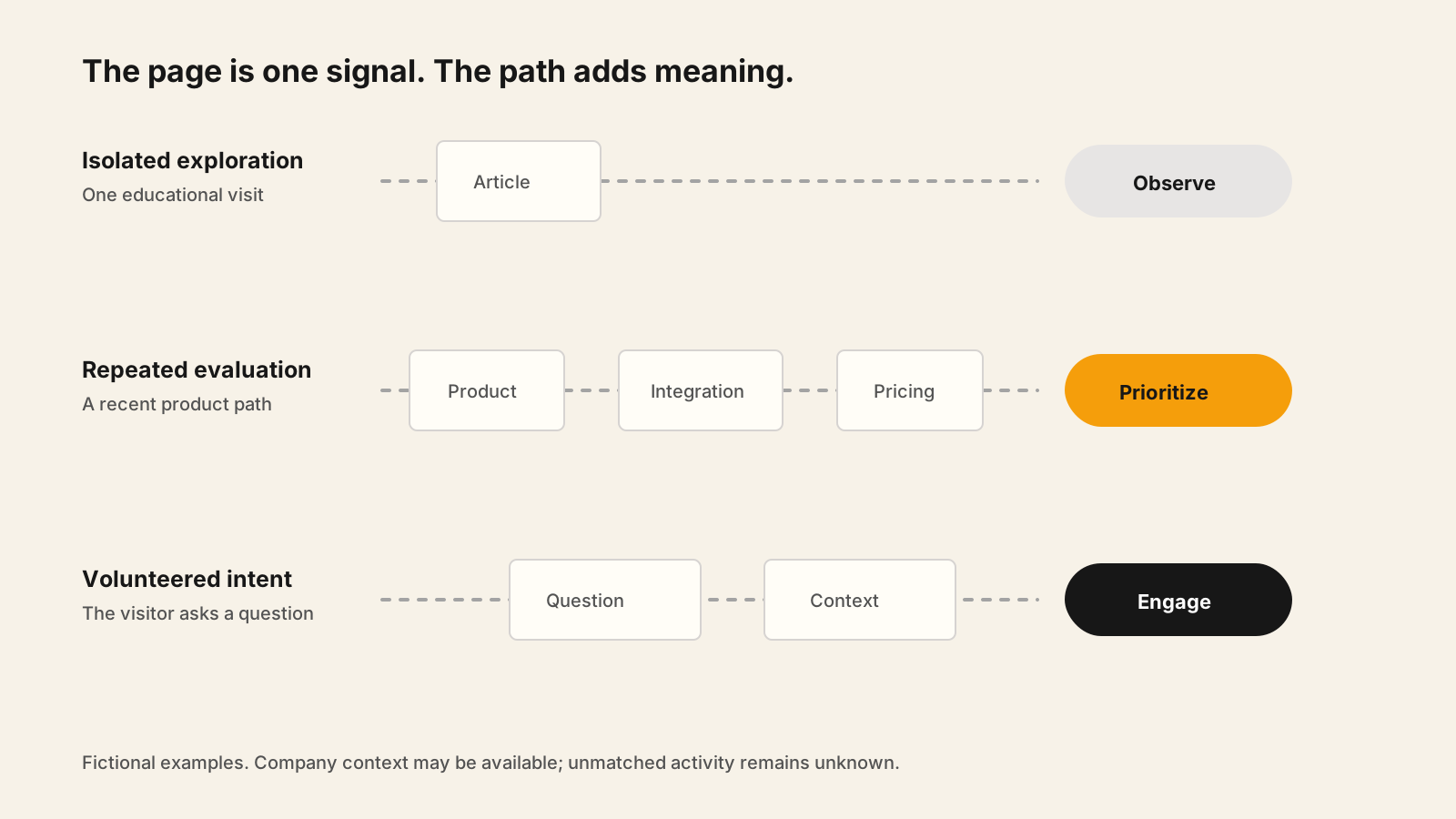
Pricing pages, comparison pages, integration pages, security pages, demo pages, and implementation pages usually carry more buying intent than generic blog traffic.

The first setup step is to decide which pages actually matter. If every page view is treated as a hot signal, the tracking system becomes noise.

2. Company-level context

Company-level identification can help a team see that an account may be researching a solution. This is useful for founder-led selling, account research, and prioritization.

But it should not be treated as personal certainty. A visit from a company network does not automatically prove which employee visited. Remote work, shared networks, VPNs, mobile traffic, and privacy tools can reduce confidence.

3. First-party behavior

First-party behavior includes the pages someone viewed, how often they returned, what path they took, and whether the visit matched a known campaign.

This behavior becomes stronger when it is connected to a clear event, such as opening pricing, asking a question, starting checkout, or submitting a form.

4. Conversation intent

AI chat can surface buying intent that page views cannot. A visitor asking whether the product works with Slack, supports a specific use case, or can be installed quickly is giving useful context.

For small teams, the strongest workflow connects the chat question to the session, the likely account, the lead details, and the recommended next step.

What software categories should you compare?

Instead of starting with a top-tools list, start with the type of workflow you need. Different tools solve different parts of visitor tracking.

Software typeStrengthRisk if used aloneGood fit
Analytics platformReliable aggregate reporting and channel analysisMay not provide account-level sales workflowTeams that need measurement first
Visitor identification toolCompany-level context and account discoveryMay not engage visitors or capture leads directlyTeams doing account research or ABM-style follow-up
Chat or chatbot toolReal-time engagement and lead captureMay not connect anonymous account context to the conversationTeams that need to answer questions and collect details
Lead scoring and alerting toolPrioritization and fast follow-upCan score weak signals if tracking inputs are poorTeams with too many sessions to inspect manually
Combined visitor intelligence platformTracking, chat, scoring, and alerts in one workflowNeeds careful setup so it does not become noisySmall B2B teams that want one practical operating flow

This is why PageFox avoids treating B2B visitor tracking as only a reporting problem. The useful outcome is not another dashboard. The useful outcome is a qualified lead, account signal, or follow-up action.

How should a small B2B team evaluate visitor tracking software?

A small team should evaluate visitor tracking software against the workflow it wants to run every week, not against the longest feature checklist.

  1. Define the intent pages that should trigger attention.
  2. Decide whether company-level identification is enough, or whether lead capture is required.
  3. Check how the tool separates anonymous account signals from submitted identity.
  4. Review whether chat, forms, scoring, and alerts are built in or require separate tools.
  5. Confirm how quickly the team can act on a hot visit.
  6. Review consent, storage, enrichment, retention, and security practices before going live.

The best evaluation question is: what will our team actually do when this system detects a high-intent visit?

If the answer is unclear, the team may not need more tracking. It may need a tighter playbook: which pages matter, who receives alerts, when to follow up, and what message is respectful.

A practical B2B visitor tracking workflow

For a founder-led or small B2B SaaS team, start with a workflow that can be run consistently.

  1. Mark pricing, comparison, security, integration, demo, and product pages as higher intent.
  2. Identify likely company context where available, but keep confidence limits visible.
  3. Use AI chat to answer questions and capture details when the visitor shows intent.
  4. Score the visit using page path, return visits, company fit, and conversation intent.
  5. Send alerts only when the signal is strong enough to justify attention.
  6. Follow up with a helpful message based on the account context, not a claim that you know exactly who visited.

This workflow keeps the system useful. It avoids two common mistakes: treating every visit as a lead, and waiting only for form submissions while useful account intent disappears.

Where PageFox fits

PageFox is built for small B2B teams that want visitor intelligence connected to AI engagement, lead capture, scoring, and alerts.

The PageFox fit is strongest when a team wants one practical workflow instead of separate tools for chat, anonymous visitor context, lead scoring, and notifications.

  • Company-level visitor intelligence for account context
  • AI chat for questions and lead capture
  • Intent scoring so the team can prioritize
  • Alerts when a session looks worth attention
  • A lightweight operating model for founder-led teams

PageFox should still be evaluated honestly. If your team needs enterprise routing, large-scale sales operations controls, or a full analytics warehouse, you may need a heavier platform. If you need a simple way to understand and act on high-intent website traffic, PageFox is designed for that narrower job.

What should you do next?

If you are choosing B2B website visitor tracking software, write down the workflow before you compare products.

  • Which pages indicate buying intent?
  • What company-level context would be useful?
  • When should chat ask for contact details?
  • What should count as a hot visit?
  • Who receives the alert?
  • What follow-up message is respectful?
  • What tracking or storage requires consent review?

Then choose the software that makes that workflow easiest to run. B2B visitor tracking is valuable when it helps a team see demand earlier and respond with better judgment.

Frequently asked questions

  • B2B website visitor tracking software helps teams connect website activity to account context, buying intent, lead capture, scoring, and follow-up. It is most useful when it turns anonymous or semi-anonymous behavior into a clear next action.

Related PageFox pages

Track intent without stitching together five tools

See how PageFox connects visitor intelligence, AI chat, lead capture, scoring, and alerts for small B2B teams.

View PageFox features
References used